Driversnote Review 2026: Is It Accurate Enough for Your Business?
Andjelka Prvulovic
Last update on:
Apr 22, 2026
Published on:
TL;DR
Driversnote has improved since our last review — the accuracy issues identified in 2025 were not reproduced in March 2026 testing. It’s a solid option for solo drivers, freelancers, and self-employed professionals tracking mileage for tax deductions.
For field teams, however, it lacks essential features like time tracking, payroll integrations, and compliance tools. If you need full workforce visibility and operational support, Timeero is the better fit.
If you’re tired of keeping paper logbooks or manually entering your trips for tax purposes, you may start looking for a better mileage tracking solution.
Many businesses turn to Driversnote, a mileage-tracking app that records trips and generates tax-compliant reports.
In this Driversnote review, we'll take a closer look at how the app works by giving you a rundown of what we liked and disliked during multiple test drives. We'll also give you our opinion on whether it's worth your money.
Timeero Makes Mileage Tracking a Breeze
With Timeero, you can track your mileage accurately and effortlessly, and enjoy faster reimbursement and bigger tax deductions.
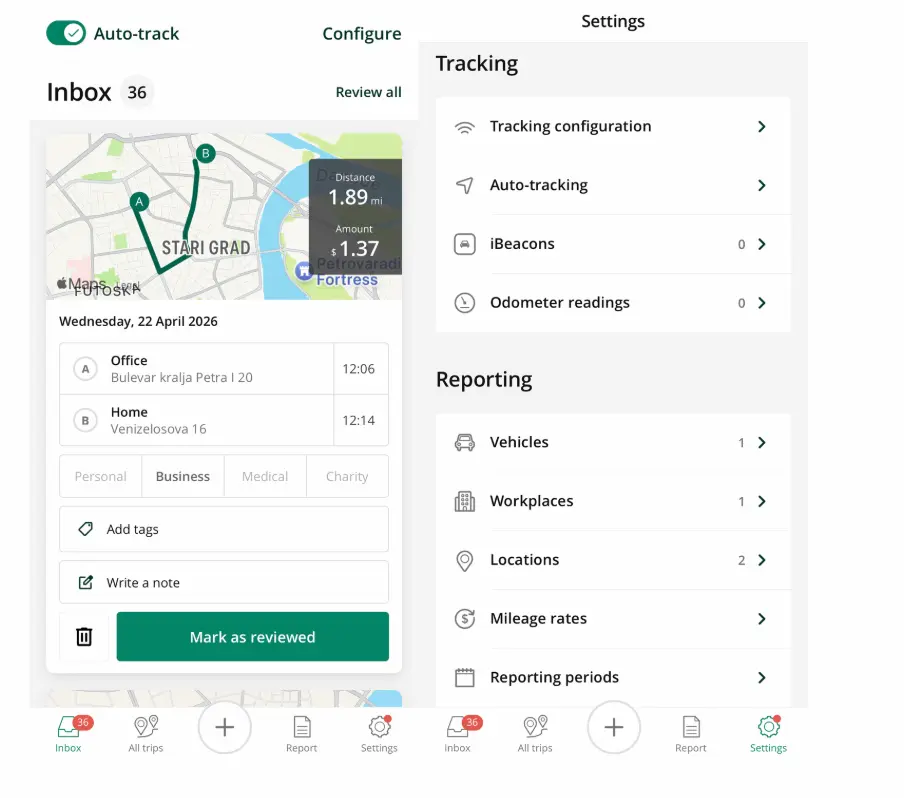
Driversnote is an easy-to-use mileage tracking solution for self-employed drivers and teams. The app provides users with multiple ways to track mileage. You can auto-track mileage using motion-detection technology, use iBeacon devices, or manually add trips and mileage logs.
One thing to understand from the start: Driversnote is built primarily for individuals, freelancers, and self-employed users tracking mileage for tax deductions. Team functionality exists, but most customers don't use it to manage their workforce. That distinction matters when you're deciding whether it's the right fit for your field team.
Creating teams with Driversnote
If you have a team that drives for work and you need to issue mileage reimbursements, Driversnote is a viable option. You can create teams and set mileage rates — either IRS rates or custom rates — to automate mileage reimbursement. Admin licenses are free; you pay only for drivers.
We set up a team account, added users, and ran the approval workflow during testing. The process was straightforward. The admin interface lets you configure reporting periods, set required fields such as notes or tags, and control what appears in reports.
Note: You can restrict visibility, so managers can only see the date and distance of personal trips, keeping personal mileage entirely off the record.
If you’re a startup, you’ll need a paid plan to create teams with Driversnote.
Adding places with Driversnote
If you have teams that need to log places or customers they visited, Driversnote makes it easy to add customer locations. When a driver parks within 500 meters of a location, Driversnote automatically selects it as the end destination. This allows you to quickly see the customers each employee visited.
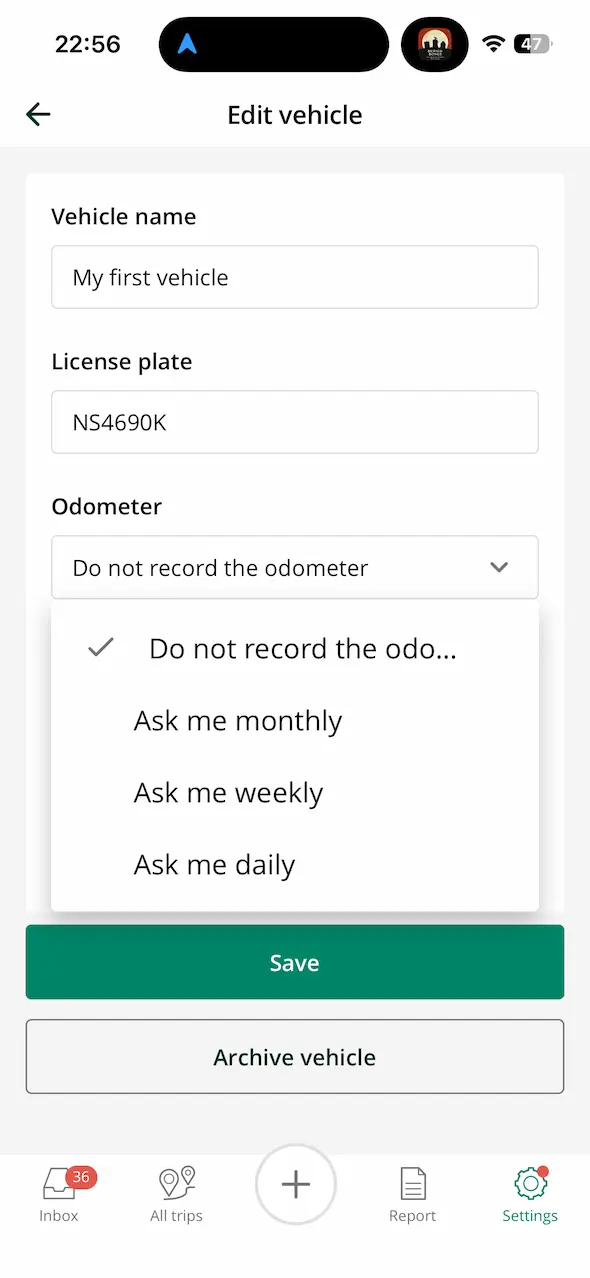
Driversnote allows adding vehicles and maintaining separate logs for each.
Driversnote review: Key features walkthrough
During our 2026 testing round — running Driversnote and Timeero simultaneously on the same iOS device for approximately one week — we were interested in answering two questions:
How does Driversnote work?
Is Driversnote's mileage tracker reliable in 2026?
Let's take a look at the results.
Mileage tracking
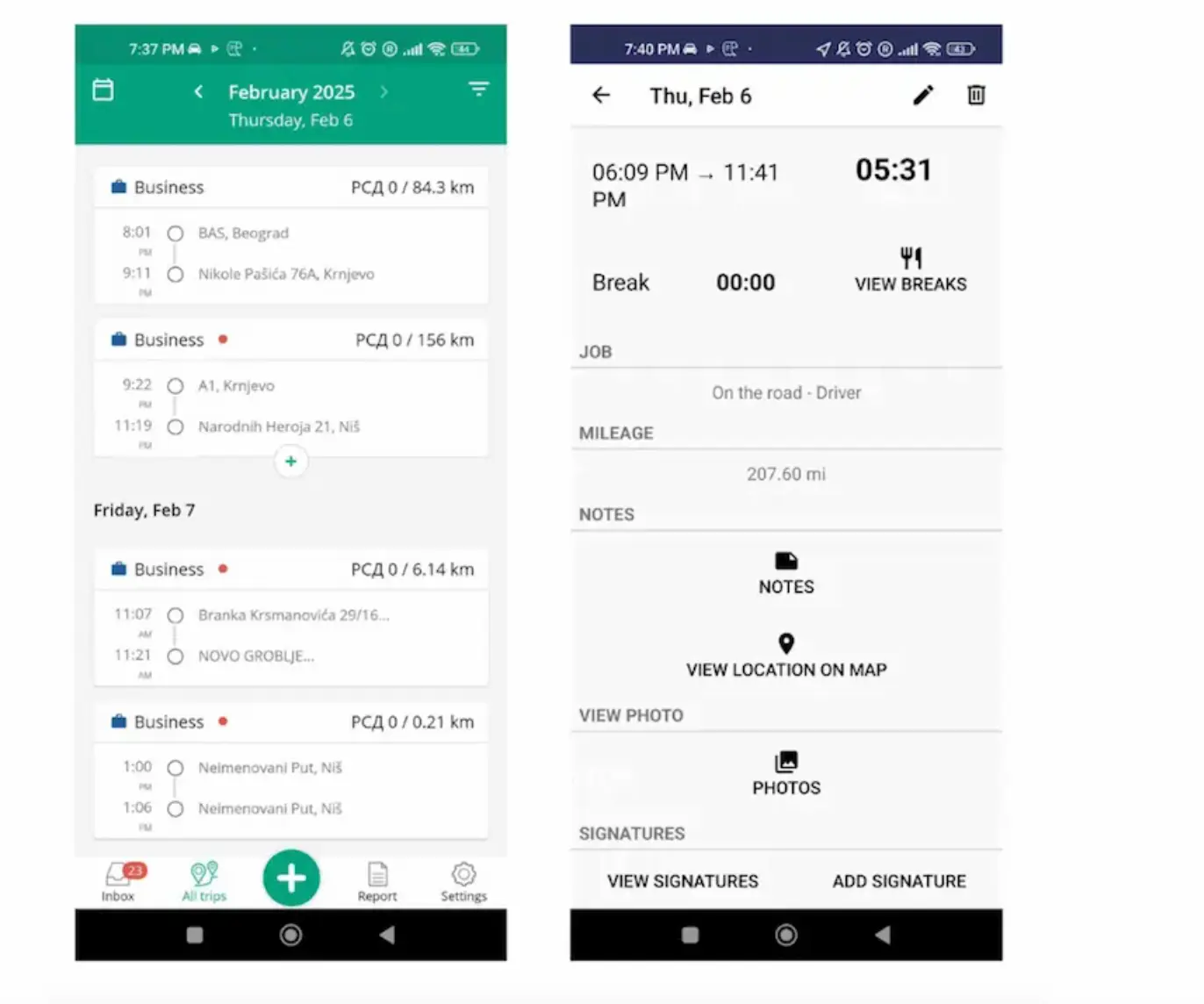
Our previous review found that Driversnote missed the first 58.9 miles of a 208.3-mile trip — a 72% accuracy rate — flagging the app's lack of a minimum speed threshold as the root cause.
Our previous testing revealed a significant gap in Driversnote's distance tracking capabilities.
Since then, our findings have changed.
In our March 2026 testing, long trips were recorded accurately with no missed segments. Running both apps simultaneously on the same device, mileage logs were consistent throughout the testing period. The trigger issue that plagued earlier versions — where the app would fail to start tracking in low-network or slow GPS wake conditions — was not observed.
Driversnote now offers two distance calculation methods, giving users more control over how mileage is recorded. This appears to have contributed to the improvement in accuracy.
With that being said, Driversnote still doesn't use a minimum speed threshold the way Timeero does. The app relies on a combination of GPS and accelerometer data to detect driving. For most users, this works well. In edge cases, it remains a variable worth knowing about.
We noticed this outside the formal test: in heavy stop-start traffic, Driversnote began capturing the route roughly 300 to 400 meters into the journey. The vehicles were barely moving, and the conditions needed to trigger tracking didn't align quickly enough. A speed threshold would have handled this differently.
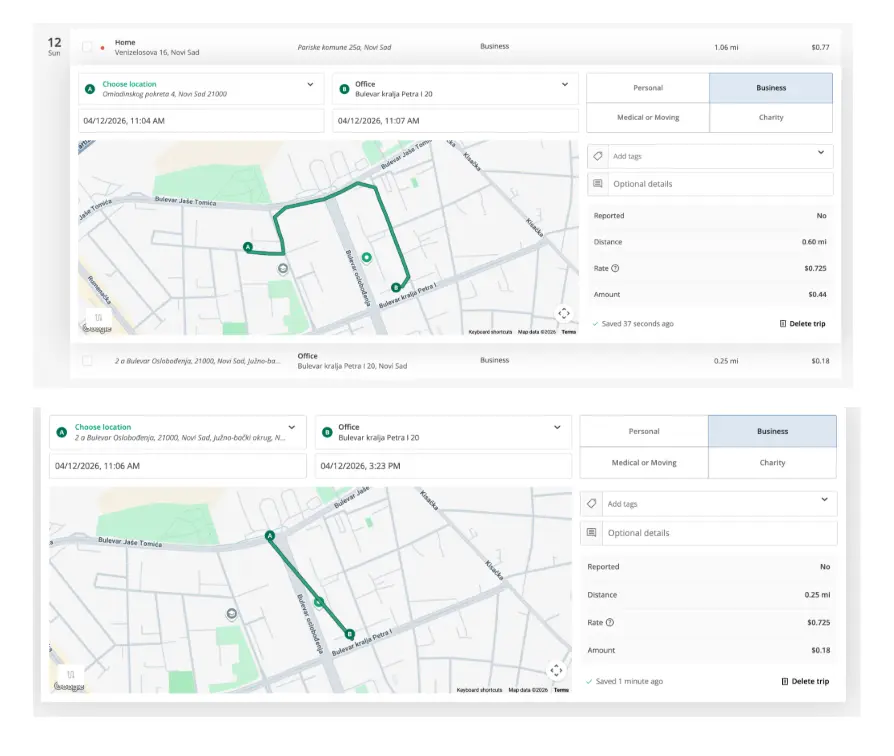
Driversnote logged the same journey as two separate trips, one with a full route that closed in three minutes, one with a straight-line path that remained open for over four hours.
A second observation from outside the formal test window, April 12, 2026: Google Maps Timeline recorded a single 0.5-mile drive. Driversnote logged the same journey as two separate trips — one that tracked the full route accurately and closed after three minutes, and one showing a straight-line path between start and end points that remained open for over four hours after the drive had ended. Timeero was not running simultaneously. One drive, two trigger events, two very different outcomes.
Timeero's minimum speed threshold prevents this type of false trigger entirely. Tracking only starts when the vehicle reaches 4.47 mph, so brief GPS fluctuations or slow-start conditions don't open a trip at all.
Phantom ride glitch
Driversnote “Phantom Ride” Glitch from previous testing
During previous testing, we recorded three phantom trips — drives logged while stationary, apparently triggered by motion or accelerometer data. Across the full 2026 testing, we observed zero phantom trips.
One complaint worth noting from current user reviews is that the auto-tracker has occasionally been reported to turn itself back on after being manually toggled off. We didn't reproduce this during testing, but it's appeared consistently enough in 2026 reviews that it's worth mentioning.
Auto-tracking with motion detection
Motion detection is not a new technology. Most best mileage-tracking apps use it to record trips, but each app handles it differently — and accuracy rates vary as a result.
Driversnote uses a combination of the phone's GPS and the vehicle's accelerometer to activate mileage tracking, rather than relying on a fixed minimum speed to start trips.
During our initial testing, a customer support agent confirmed this directly: “The system is configured so that there are a few conditions (other than speed) that will recognize if and when you are driving."
Driversnote doesn’t have a minimum speed the vehicle must hit for the app to track mileage.
This approach works reliably under normal conditions, but edge cases do exist.
Automatic tracking with Driversnote iBeacon
In addition to motion detection, you can use an iBeacon device to streamline mileage tracking.
What is iBeacon?
iBeacon is a Bluetooth device you can place anywhere in your car. It transmits a signal which is synced with the driver's smartphone. When the driver enters the vehicle, the phone picks up the signal, Driversnote opens, and the app begins tracking. When the driver exits the vehicle, tracking stops.
iBeacon ensures Driversnote only tracks mileage when the driver is in a specific company vehicle. If an employee is a passenger, on a bicycle, or using public transport, Driversnote won't log it.
We didn't have access to iBeacon hardware for this review, so what follows is based on vendor documentation and user reviews rather than direct testing.
Long-term iBeacon users are reporting up to 99% accuracy in 2026 reviews — a meaningful data point for anyone who depends on precise mileage logs. The setup process can feel slightly technical for non-technical users, but once it's running, it's reliably hands-off.
iBeacon isn't available on the free plan. You'll need to purchase a paid subscription, and pay a one-time $40 fee for the device. If subscribing annually, the device is free.
Driversnote also allows you to add trips manually, which is helpful if you forget to track mileage. As with any manual option, it's worth having a clear policy in place to prevent misuse.
Driversnote offline mode
To test offline mode, we switched off the internet connection during a return trip in an unfamiliar location. Both Driversnote and Timeero continued logging accurately throughout. This makes Driversnote a reliable option for drivers traveling in areas with limited or no connectivity.
Drive classification
Whether you track mileage through motion detection or iBeacon, you'll still need to categorize trips. Driversnote's mobile app and web interface make this straightforward. Although the app doesn't support one-swipe classification like MileIQ (read our MileIQ app review), the process is quick enough not to be a friction point in daily use.
Classifying a trip on the web dashboard is easy. First, click the trip to open it, then hit “personal” or “business” to classify it. When you classify the trip, Driversnote applies the corresponding mileage rates and automatically calculates reimbursement amounts.
Auto-classification
Manually classifying every trip gets tedious — and classification errors tend to pile up when drivers have to do it retroactively. Driversnote's auto-classification options cover four scenarios:
Based on the previous trip. If you classified a location as "business" before, future trips there are classified the same way automatically.
Always as business. All trips logged as business.
Always as personal. All trips logged as personal.
Based on work hours. The most accurate option. Trips during set work hours are classified as business; trips outside those hours are classified as personal.
Driversnote lets you set your work hours to simplify drive classification.
The work hours option is particularly useful for privacy-conscious employees, since automatic tracking can be disabled outside work hours.
Reporting with Driversnote
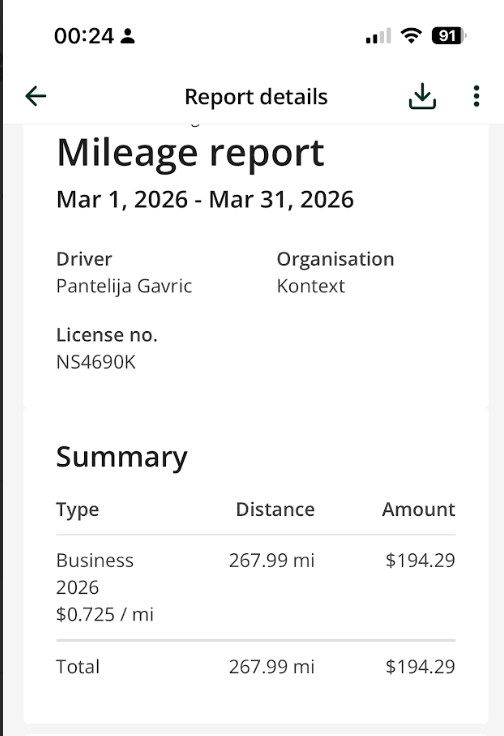
Driversnote generates customizable reports that include reimbursement details and mileage records. Reports can be sent directly to departments or downloaded as PDFs or Excel files — both formats are clean enough that accountants rarely push back on them.
Each report includes the driver's name, organization, license plate, date range, and a per-trip breakdown covering start and end address, distance, rate, and reimbursement amount.
Standard report types include reimbursement reports, vehicle mileage reports, and odometer log reports. Reporting periods can be set to daily, weekly, bi-weekly, monthly, quarterly, or yearly, with automatic reminders if an employee forgets to submit.
The admin settings include a few features worth flagging for team use.
An edit log can be attached to PDF reports, creating an audit trail that tax authorities can follow.
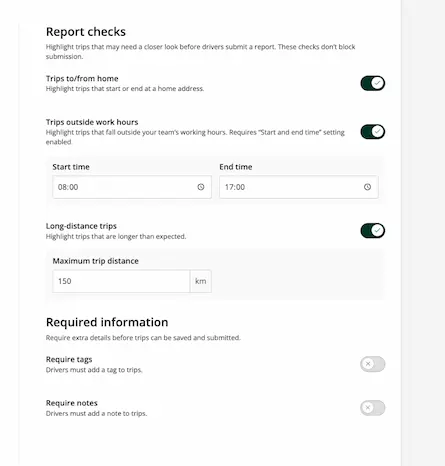
Report checks let admins flag trips that may need a closer look before drivers submit reimbursement claims. Admins can flag trips to or from home, trips outside work hours, and unusually long-distance trips.
Pros
Cons
Accurate mileage tracking (2026 update)In our latest testing, Driversnote consistently recorded long trips with no missed segments — a clear improvement over earlier versions.
Multiple tracking methodsChoose between automatic tracking (motion detection), manual logs, or iBeacon for more controlled tracking.
iBeacon improves reliability for vehicle-based trackingWhen paired with a vehicle, iBeacon helps eliminate false trips and improves consistency — especially for frequent drivers.
Works offline without data lossTrips continued to log accurately even without an internet connection, making it reliable in low-signal areas.
Clean, accountant-friendly reportsReports include all required fields (distance, rate, reimbursement) and export cleanly to PDF or Excel.
Simple setup for individuals and small teamsMinimal onboarding friction — most users can start tracking within minutes.
No time tracking or workforce management featuresDriversnote focuses strictly on mileage. There's no way to track work hours, job time, or employee activity.
Limited functionality for field teamsWhile team features exist, there's no support for:
payroll integrations beyond basic exports
job-based tracking
real-time workforce visibility
No minimum speed threshold for trip detectionThe app relies on motion detection instead of speed thresholds, which can create edge cases in slow or stop-start traffic.
iBeacon requires extra cost and setupYou'll need a paid plan plus hardware (~$40 per vehicle), and setup may feel slightly technical for some users.
Auto-tracking edge cases still existIn certain conditions (e.g., slow starts), tracking may begin slightly after the trip has already started.
Quick Verdict
Driversnote is a strong choice for individual drivers and freelancers who need reliable mileage tracking for tax reporting.
For businesses that need time tracking, payroll integration, or full visibility into field operations, it lacks the depth required for day-to-day team management.
What is the price of Driversnote?
Driversnote's pricing model includes free and paid plans. Verify current pricing at driversnote.com before committing — figures below are current as of our March 2026 review.
Free plan
15 trips per month
Manual and auto-tracking included
iBeacon not available
Individual paid plan
$11/month
Unlimited trips
iBeacon support (device $40 one-time, or free with annual subscription)
Automated reports
Teams
You pay only for drivers — admin licenses are free
Small teams: 2 to 10 users $11 per licence/ per month
Larger organizations: custom pricing
Centralized billing, approval workflows, and team-wide reporting
For a rough cost example: a 5-person field team on the paid plan would pay approximately $55 per month, plus $40 per vehicle for iBeacon hardware if needed. That's before factoring in any manual reconciliation time if your payroll system isn't Xero or QuickBooks.
Timeero: The best Driversnote alternative
Driversnote is a good fit for what it's built for: individual and freelance mileage tracking with strong tax compliance. But if you manage a field team and need employer-side controls, the use cases diverge.
Timeero is a GPS-based time and mileage tracking app built for field teams. It automatically logs every mile using a minimum speed threshold — tracking starts when the vehicle exceeds 4.47 mph — and gives managers a segmented view of where employees drove, how long they spent at each job site, and how much mileage accumulated between stops. Unlike Driversnote, Timeero combines mileage tracking, time tracking, real-time location visibility, geofencing, break tracking, scheduling, and direct payroll integrations into a single tool.
Feature
Driversnote
Timeero
Best for
Individuals, freelancers
Field teams, businesses
Mileage tracking
Yes (GPS + motion detection)
Yes (GPS + speed threshold)
Time tracking
❌ Not available
✅ Built-in
Segmented tracking (multi-stop days)
❌
✅
Payroll integrations
Limited (exports, basic integrations)
Extensive (QuickBooks, ADP, Gusto, etc.)
Real-time location tracking
❌
✅
Geofencing
❌
✅
Commuter mileage exclusion
❌
✅
Offline mode
✅
✅
Accuracy control
Medium (no speed threshold)
High (speed threshold + route data)
Best use case
Tax-compliant mileage logs
Workforce tracking + mileage + compliance
Here are the key differences:
✅ Minimum speed threshold. Timeero starts tracking when your vehicle exceeds a predefined speed (4.47 mph by default), ensuring only qualifying movement is logged. This handles the edge cases that motion-detection-only systems can produce in slow or stop-start conditions.
✅Segmented Tracking. Timeero's Segmented Tracking automatically breaks a driver's day into segments based on stops made, capturing miles driven and time spent at each location. For a field service team running three job sites in a day, the admin view shows exactly how long each employee spent on site and how far they drove between stops — all tied to the timesheet.
✅Commuter mileage exclusion. Define commute mileage per employee and automatically exclude non-deductible commutes from mileage logs, keeping records IRS-compliant without manual intervention.
✅Enhanced accountability. Timeero provides detailed timestamps and speed data via clickable breadcrumbs on route maps. This helps verify routes, resolve discrepancies, and confirm adherence to company driving policies across a team.
Additional features include: real-time location tracking, geofencing, advanced time tracking, and direct integrations with QuickBooks, ADP, Gusto, Paychex, Xero, Rippling, and Paylocity.
Final thought: Is Driversnote worth it?
Driversnote has improved meaningfully since our last review. The accuracy issues we documented previously, such as missed mileage segments and phantom trips, were not reproduced in our 2026 testing. Long trips logged accurately, offline tracking held up in unfamiliar locations, and the new web app and Google Maps Timeline import are genuine additions.
If you're a solo driver, freelancer, or self-employed professional tracking mileage for tax deductions, Driversnote is a solid choice. The iBeacon option makes it particularly dependable for anyone who can justify the one-time hardware cost — though we'd recommend checking recent user reviews before committing, since we weren't able to test it directly.
If you manage a field team and need employer-side controls — Segmented Tracking, payroll integration, geofencing, commuter exclusion, Driversnote isn't designed for that job. Timeero is.
FAQs: Driversnote Review
How does Driversnote track mileage?
Driversnote uses a combination of GPS and accelerometer data to detect when you're driving and automatically logs the trip. You can also use iBeacon, a Bluetooth device placed in your vehicle, for more precise, vehicle-specific tracking.
Does Driversnote iBeacon actually improve accuracy?
Based on user reviews rather than our own testing, as we didn't have access to iBeacon hardware for this review, long-term iBeacon users are reporting up to 99% accuracy in 2026. It solves the most common motion-detection edge case: the app only tracks when you're in a specific vehicle, eliminating false starts from being a passenger or using other modes of transport.
How much does Driversnote cost in 2026?
The free plan covers 15 trips per month. The individual paid plan is $11/month and includes unlimited trips and iBeacon support. The iBeacon device costs $40 one-time, or comes free with an annual subscription. Teams pricing is based on the number of drivers, admin licenses are free.
What are the main differences between Driversnote and Timeero?
Driversnote is built for individuals and freelancers tracking mileage for personal tax deductions. Timeero is built for employers managing field teams — with Segmented Tracking, commuter mileage exclusion, payroll integrations, and real-time location visibility. Different audiences, different jobs.
Is Driversnote good for teams and businesses?
For small teams needing straightforward mileage reimbursement, yes. For employers who need payroll integration, Segmented Tracking, geofencing, or detailed workforce visibility, Timeero is the more appropriate tool.
Does Driversnote work offline?
Yes. We tested offline mode by switching off connectivity in an unfamiliar location during a return trip. Driversnote continued tracking accurately throughout. It's a reliable option for drivers in areas with limited or no internet connection.
Take Timeero mileage tracking features for a spin risk-free.
Andjelka is a researcher and writer with 7+ years in digital marketing. Her background in social work and journalism has sharpened her skill in connecting with people from all walks of life. For the past 4 years, she’s specialized in time, location, and mileage tracking. Outside work, she enjoys yoga, swimming, and unwinding with her cats while listening to Leonard Cohen’s music.






.webp)
.webp)

.webp)


.png)
.png)



.png)


